File I/O and the Universal I/O Model.
- We are looking at chapters 4 and 5. READ them.
- As we have seen, file descriptior are small integers
- Usually some are open when the program starts.
- Others can be created with pipe.
- We will soon look at open
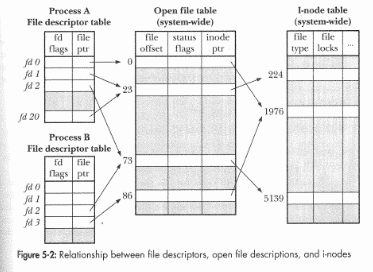
- We will refer to this picture
- Note that each process has a File descriptor table
- This points to the system wide Open File Table.
- Which points to the system wide I-node Table
- Which points to devices, file systems and other things.
- In this picture
- For process A, fd1 and fd20 both point to the same open file, how did this happen?
- For process A, fd2 and process B, fd2 both point to the same file, how did this happen?
- The Unix/Linux I/O system is called universal.
- This means that everything that you can perform I/O on looks like a file.
- Or at least uses the open, read, write, close, file descriptior semantics.
- What are these files?
- Caution, they are not text files, object files, libraries,...
- These are all examples of regular files
- Writing seven different types of regular files on a test is good for one point out of seven.
- The seven types are
- Regular files, what you think of as a file.
- Directories, or what you might call a folder.
- Symbolic links.
- There is another type of link called a hard link, but this is really not a distinct file type, it is a regular file with multiple directory entries.
- Named Pipes, a file system implementation of a pipe
- Sockets, a file system implementation of a different communications device
- Character special devices, the interface to hardware that transfers data a character at a time (keyboards)
- Block special devices, the interface to large data transfer hardware (hard drives).
- We should explore these
- ls -l
- type field.
- Permission fields.
- ln -s oldfile newfile
- mkfifo pipename
- /dev/
- tty
- I have implemented a version of his copy program (page 71) here