Triangles
- We won't finish this demo today, but we will discuss parts of it.
- We really like triangles in openGL.
- They are simple
- IE there can be no crossing edges.
- it is easy to tell what is inside and what is outside.
- They are also co-plainer
- This makes checking for a front face easier
- It is easy to detect a degenerate triangle.
- The points are all co-linear.
- If a polygon is convex, fan triangulation can be used to draw it.
- Pick a vertex and draw triangles in order
- This is the algorithm used in gl.TRIANGLE_FAN
- In both gl.DrawElements and gl.DrawArrays
- There are other algorithms that transform a convex polygon into triangles that might perform better.
- They are simple
- Front face detection
- A normal to a plane is a vector pointing perpendicular to that plain.
-
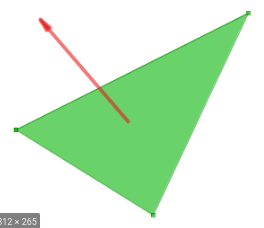
- Note, this is not normalized
- $|a| = \sqrt{a_0^2+a_1^2+...+a_n^2}$
- A vector $a$ is normalized if $|a| = 1$.
- To normalize a vector $a$ just compute $\frac{a}{|a|}$
- This is also called a unit vector
- It gives direction.
- For two vectors in 3 space the cross product
- Is defined in multiple ways.
- For vectors $a$ and $b$
- $ a \times b = \begin{bmatrix} a_2b_3 - a_3b_2 \\ a_3b_1 - a_1b_3 \\ a_1b_2 - a_2b_1 \end{bmatrix}$
- A separate interpretation is $a \times b = |a||b| sin(\theta)n $
- Where $|a|$ is the magnitude of a.
- But if we make $a$ a unit vector , ($\frac{a}{|a|}$), $|a| = 1$
- We can use the cross product to compute a normal vector.
-
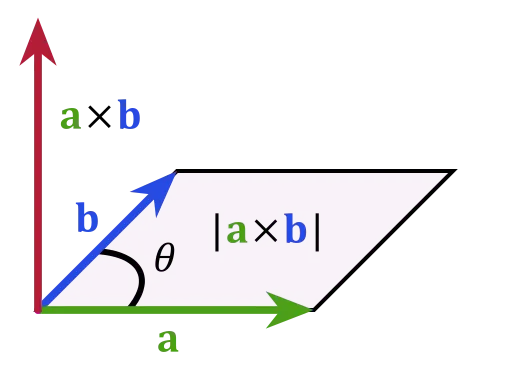
- Again, we can normalize the results to eliminate the $|a||b|sin(\theta)$ term.
- We will be left with a normalized normal to the triangle.
-
- Note that $a \times b = - (b \times a)$
- So the "order" of the points makes a difference.
- We need to specify all vertexes for all triangles in either a clockwise or a counter-clockwise direction.
- We also know "where" we are looking
- This is called a "look at " vector.
- We are looking from (0,0,0) to (0,0,1) in the basic camera
- We will specify the lookat vector later
- We need to specify all vertexes for all triangles in either a clockwise or a counter-clockwise direction.
- The dot product of two vectors
- $a \cdot b = a_1b_1 + a_2b_2 + a_3b_3$
- $a \cdot b = |a||b| cos (\theta)$
- Where $\theta$ is the angle between a and b.
- Remember for angles between -90 and 90 cos is positive.
-
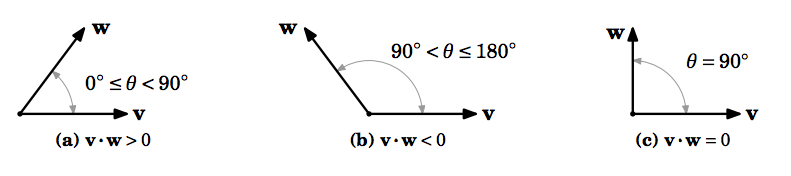
- So the if the dot product between a surface normal and the lookat vectors are positive, we can see the front face.
- If they are negative we can not see the front face.
- In *GL
- The engine will
- Tell the fragment shader the "face" of a triangle the pixel we are looking at is on.
- The variable gl_FrontFacing is a boolean
- True if the pixel is on a front face.
-
if (gl_FrontFacing) {
    // front face, draw it with the face color
    gl_FragColor = f_Color;
} else {
    // back face, draw it gray
    gl_FragColor = vec4(0.5, 0.5, 0.5, 1.0);
}
- Remove any triangles we don't want to see.
- This is an option that must be turned on.
- use gl.enable(gl.CULL_FACE)
- it can be turned off with gl.disable(gl.CULL_FACE)
- We use g.cullFace(mode)
- And we can specific the face to "cull"
- gl.FRONT
- gl.BACK
- gl.FRONT_AND_BACK
-
    ChangeFace(value) {
       switch(value) {
          default:
          case '0':
              this.gl.enable(this.gl.CULL_FACE);
              this.gl.cullFace(this.gl.BACK);
              break;
          case '1':
              this.gl.enable(this.gl.CULL_FACE);
              this.gl.cullFace(this.gl.FRONT);
              break;
          case '2':
              this.gl.enable(this.gl.CULL_FACE);
              this.gl.cullFace(this.gl.FRONT_AND_BACK);
              break;
          case '3':
              this.gl.disable(this.gl.CULL_FACE);
              break;
        }
    }
- This is an option that must be turned on.
- The engine will