Homework 2: Like a Spiral in a Circle
Short Description:
Write a program that creates a crude spiral in a canvas.Goals
When you finish this homework, you should- Used the moveTo and lineTo primitives in the HTML canvas to draw a simple object.
- Created a simple user interface in HTML
- Begin to think about things in a more graphics like way.
Formal Description
Write a program that will draw a spiral in the html canvas.You should present the user with a simple interface which contains
- A canvas
- An input box that lets the user adjust the canvas width
- An input box that lets the user adjust the canvas height
- An input box that lets the user adjust the spiral spacing
- A button which allows the user to redraw the spiral.
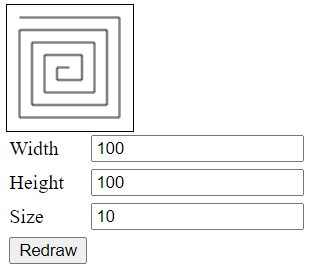
Your program should initially resize the canvas to the default values stored in the input boxes (100,100) and draw a spiral.
When the user changes the input and presses the redraw button, you should, if this input is acceptable, adjust the size of the canvas and redraw the spiral.
The canvas may be no smaller than 50x50 and the space must be at least 3. The space must be less than the 1/2 of width or height of the box, whichever is smaller.
If inappropriate values are input, the program should catch these, refuse to change, and replace the values in the input box with the previous values.
To draw a spiral, start at (size, size) and draw a line to (canvas.width-size, size). Then draw a line from (canvas.width-size, canvas.height-size). Repeat this process, decrementing or incrementing the starting and ending points appropriately to draw a spiral. The process should end when there is no way to draw a line that would not intercept the figure.
Documentation
Please use relative references to your code in the html file. This will allow me to extract the file in my local environment.Additional Requirements/Comments
- I expect you to build your code based on my examples.
- You might want to look at parseInt.
- I used a state machine and a
switchstatement.- The program started in state 0, which represented drawing the top line.
- This also adjusted one of my "corners" and based on this transitioned to the next state (1) or the exit state (4)
- States 1-3 did the same but for different lines.
- State 4 was the exit state.
- The program started in state 0, which represented drawing the top line.
- Random edge colors might be a nice touch.
- You may work in groups, if you do so:
- Each person should submit the work.
- Note the people in your group on your project page.
- You may use AI, if you do so:
- Please note the extent to which you employed the ai and the purpose.
- If you used the ai to completely generate this work, please note that as well. I do not want to grade a program that was more than 50% generated by ai. If this is the case, let me know and I will give you full credit.
Extras
I find that I want to continue to play with simulations/visualizations of this type. Please do so, but only if you have sufficient time, do not enhance this, or any other project at the expense of your other classes.Submission
When you have finished your assignment, please submit a tar or zip file containing all files needed for this project. Please do not post your project on line until after grades have been assigned.Submit your file to the D2L homework folder Homework 2 by the due date.