Some Assembly
Notes
- This is based Jorgensen chapter 2 (digital page 22 if you wish).
- We understand that
- The CPU performs computations
- The memory holds data for/from those computations.
- Memory is slow, the CPU is fast.
- So registers are temporary memory in the CPU
- The X86 chip has 16 General Purpose Registers.
- The first 8 have strange names (a,b,c,d, sp, bp, si, di)
- The next 8 have better names (r8 - r15)
- These registers can be used for different sizes of data
- The a register for example.
- al is the bottom 8 bits
- ah is the next 8 bits
- ax is the bottom 16 bits
- eax is the bottom 32 bits
- rax is the full 64 bit register.
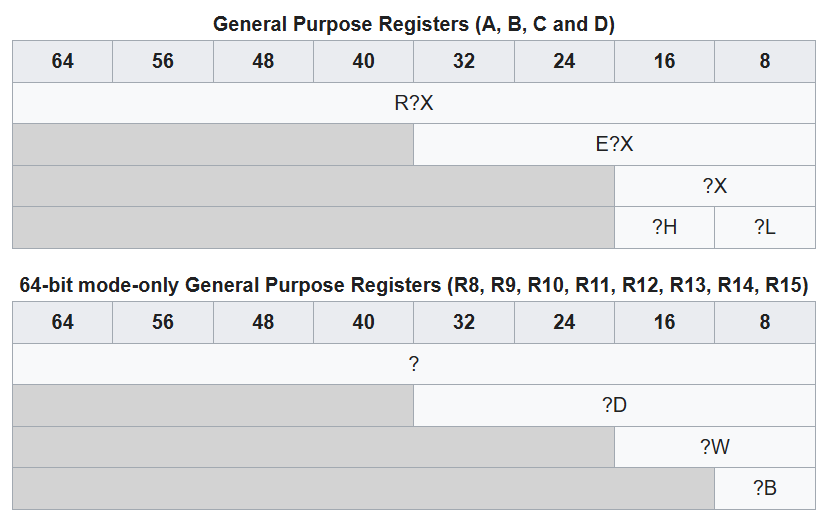 From wikipedia.
- The 8086 had the first 8 registers
- it was 16 bit, but ah and al were available
- From that we have inherited that
- a word is 16 bits, 2 bytes, 4 hex digits
- a double word is 32 bits, 4 bytes, 8 hex digits
- a quad words is 64 bits, 8 bytes, 16 hex digits
- and remember a byte is 8 bits, 1 byte or 2 hex digits.
- By the way, I use This Cheat Sheet constantly
- For now, only use registers marked as "scratch" not "preserved"
- We will discuss this, but not NOW.
- Declaring memory
- The
.datasection is for initialized data - The
.bsssection is for uninitialized data
- The
- Jorgensen gives a misleading table about data sizes
- A char is always a byte, BUT CAN BE LARGER
- A short is at least 16 bits, 2 bytes BUT CAN BE LONGER, and is at least as big as a char
- A int is at least 16 bits, 2 bytes BUT CAN BE LONGER, and is at least as big as a short, and is 32 to 64 bits depending on the hardware and compiler
- A long is at least 32 bits, 4 bytes BUT CAN BE LONGER, and is at least as big as a int, and is 64 to 128 bits depending on the hardware and compiler
- To be safe use int16_t, int32_t and int64_t in modern c++
- When we declare data in the
.datasection- reference.
- label[:] size_pseudo_op value[,value]
- The size_pseudo_op is actually a pseudo instruction.
- This is an instruction to the assembler that
- Just sets up memory
- Is turned into multiple or different instructions
- Or some other edge cases.
- In this case, it sets up memory.
- The size_pseudo_ops are
- db - byte, byte
- dw - word, 2 bytes
- dd - double, 4 bytes
- dq - quad, 8 bytes.
- Hex constants in NASM
- Either 0xdddd
- or 0dddh
- or 0dddH
-
section .data myByte: db 0xFE myOtherByte: db 0A5H myOtherOtherByte: db 5Ah myWord: dw 0xA50F myDouble: dd 0x12345678 myQuad: dq 0x123456789ABCDEF phrase: db "This is a phrase",0 - We will be back to visit this again, but I want to get programming
- Start a new program
- Add these constants to your code.
- Review how to compile
- The
movinstruction- This is discussed in chapter 7 of Jorgensen, digital page 86
- Again this is just a start
-
mov dest, src- Move data from the source to the destination
- The src can be
- literal constant
- a memory address
- the contents of memory
- a register
- The destination can be
- a memory location
- another register
- BUT NOT: a literal constant
- And we can not move from memory to memory.
- And the source and destination should be the same size
- We may have to specify size.
- For now
mov reg, [memory label]will do
- Let's move some data into a register
- Again for now, let's restrict ourselves to the A register.
-
mov al, myByte - Compile it.
- Run it
- Did it work?
- The Gnu Debugger (gdb)
- The GDB Cheat Sheet will be very useful.
- Code needs to be compiled with -g
- A collection of commands
-
break label,b label- could be label, line number
-
run -
print /x $alor p -
x /1xb &myByte -
step, s, step and step into functions -
next, n, step but don't step into functions -
quit
-
- Add code to load each of the different types into register A and look at them.
- You might need to scope with
move rax, byte [myByte] - You might want to
mov rax, 0first.
- You might need to scope with